
How to Control Pickering PXI/PXIe Modules Remotely Using gRPC
| Item | Details |
|---|---|
| Product | Pickering Remote Gateway – gRPC server and protobuf (.proto) interface files |
| Applies to | Pickering PXI/PXIe modules in a PXI chassis controlled by the Pickering PXI driver |
| Server platforms | Windows and Linux |
| Client platforms | Any operating system and any language with gRPC + Protocol Buffers support |
| Audience | Test engineers and software developers building gRPC-based test applications |
In short
Pickering Remote Gateway turns a PXI chassis fitted with Pickering modules into a network-accessible
service. You install the Pickering Remote Gateway server on the PC or embedded controller connected to the chassis,
then control the modules from client applications on other machines using standard gRPC – in LabVIEW, Python, C#, C++,
Go, Java and many other languages – without installing the full Pickering drivers on the client.
About Pickering Remote Gateway
Pickering Remote Gateway is a gRPC-based solution that enables remote control of, and interaction with, Pickering PXI/PXIe products installed in a PXI chassis. Customer applications can run on other computers, on different operating systems, and can be written in a wide range of programming languages.
gRPC is a modern, open-source, high-performance Remote Procedure Call (RPC) framework. It lets a client application call methods on a remote server as if they were local functions.
In the context of Pickering Remote Gateway:
- The server is the PC or embedded PXI controller physically connected to the PXI chassis, which houses Pickering modules. It runs the Pickering Remote Gateway server, which receives remote requests and calls the local Pickering driver API.
- The client is your test application, running on any remote PC, which sends requests to the server using gRPC.
- Pickering Remote Gateway server – a gRPC server process for Windows and Linux, installed on the machine connected to the hardware. On Windows, it can optionally be installed as a Windows service.
- Protobuf (.proto) files – the interface contract. They define the service methods, request/response messages, enumerations and the error model for the remotely callable driver functions.
- Example client code – ready-to-run examples (Python, C++ and C#) that show how to connect to the server and control cards.
Typical Use Cases
A typical scenario: a test engineer uses a Pickering PXI chassis with Pickering PXI/PXIe modules and needs to interact with those modules remotely, from another computer or from a centralized software system. This is exactly what Pickering Remote Gateway is designed for.
Language- and OS-independent test applications
Once a PXI/PXIe module is exposed through gRPC, you can control it from any operating system environment with gRPC and Protocol Buffers support (for example, LabVIEW, Python, C#, C++, Go or Java). You no longer need vendor-specific driver bindings for every language or operating system. This is especially valuable in larger organizations with mixed technology stacks.
Sharing a PXI system between multiple users and systems
Pickering Remote Gateway exposes Pickering modules – such as switching, simulation and instrumentation modules – as gRPC services. Clients on other PCs can control them without the full Pickering drivers installed locally. This removes the classic constraint that the test application must run on the embedded PXI controller.
Decoupling test logic from hardware location
PXI/PXIe hardware can be hosted in a central rack room while test sequences run on distributed development machines or CI/CD runners, communicating purely via gRPC. This suits validation labs and production lines where hardware is shared between teams.
Scaling across multiple PXI chassis
Each chassis or rack can run its own Pickering Remote Gateway server, exposing the modules installed on it. A central test controller can then address several chassis over the network and allocate resources as needed.
Integration with cloud and microservice architectures
gRPC is widely used in microservice architectures. Exposing instruments as gRPC services makes it straightforward to integrate test resources into automated pipelines, container-orchestrated environments or cloud-based data analysis services – for example, a "measurement-as-a-service" model where jobs are dispatched to PXI back-ends.
How Pickering Remote Gateway Helps You
| Benefit | What it means for you |
|---|---|
| PXI as a network device | A PXI chassis can be accessed over the network in a similar way to an LXI chassis. |
| Any programming language | Client applications can be written in virtually any language that gRPC supports. Officially supported gRPC languages include C# / .NET, C++, Dart, Go, Java, Kotlin, Node.js, Objective-C, PHP, Python, Ruby and Swift. |
| Any client operating system | The client only needs a gRPC library and code generated from the .proto files – no Pickering driver installation is required on the client. |
| Multiple clients, one server | Several clients can connect to a single Pickering Remote Gateway server. The server communicates with the standard Pickering driver, so clients do not rely on shared memory. |
| Strongly typed, contract-first API | The .proto files define every method and message precisely. Client code is generated automatically, reducing hand-written interface code and integration errors. |
| Efficient transport | gRPC uses HTTP/2 and compact binary Protocol Buffers encoding, with multiplexing of many calls over one connection. |
| Builds on existing drivers | Pickering Remote Gateway calls the same proven Pickering driver API that local applications use. |
Technical Information for gRPC Users
Architecture
The Pickering Remote Gateway server runs on the machine connected to the chassis and sits on top of the Pickering driver (for example, Pickering PXI Direct IO Driver). Your client application talks to the server using binary request/response messages over HTTP/2.

Figure 1 – PICKERING REMOTE GATEWAY architecture: Pickering driver and gRPC server on the chassis side, gRPC client in your custom software
How a call flows:
- Your client calls a method on a stub generated from the Pickering .proto file (for example, OpenCards).
- The gRPC library serializes the request with Protocol Buffers and sends it to the Pickering Remote Gateway server over HTTP/2.
- The Pickering Remote Gateway server calls the corresponding function in the local Pickering driver.
- The result – including an error code – is returned to the client as a typed response message.
Server components
The Windows installer or Linux server package lets you choose one or more server components. Each component exposes one Pickering driver interface through gRPC:
| Server component | Description |
|---|---|
| PIRG_Server_pilpxi | gRPC server for the Pickering Pilpxi PXI driver interface. Used in the examples in this article. |
| PIRG_Server_pipx40 | gRPC server for the Pickering Pipx40 PXI driver interface. |
| PIRG_Server_Clientbridge | gRPC server for the Pickering ClientBridge interface (used with Pickering LXI products; requires the LXI driver). |
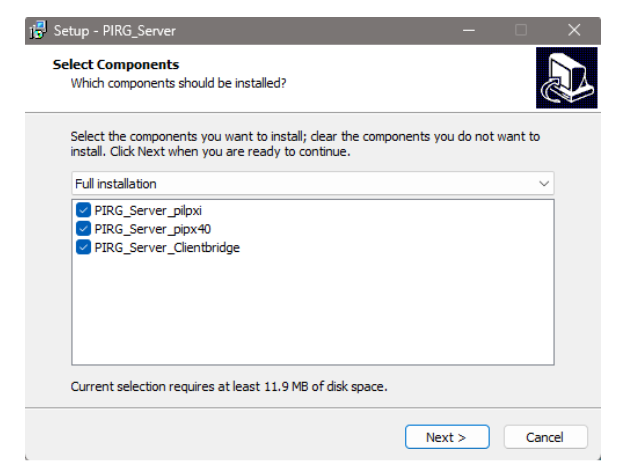
Figure 2 – Selecting server components in the Windows installer
Note: The server component names use the prefix PIRG_ — this is the internal technical identifier for the product and appears in installer component names, executable names and file paths throughout the installation. It does not affect how you use the server.
Each server has a matching .proto file (for example, pilpxi.proto). Use the .proto file that matches the server you run. The procedures in this article use Pilpxi; for other servers, change only the .proto file name and the server name.
Communication details
| Parameter | Value |
|---|---|
| RPC framework | gRPC |
| Transport | HTTP/2 |
| Interface definition / encoding | Protocol Buffers, proto3 syntax |
| Default port | 50051 |
| Address and port configuration | Command-line arguments (--ip, --port)
or the .ini file in the server installation folder |
| Transport security | The server starts with TLS when a certificate and key are configured. If none are found, it logs a warning and runs without TLS (insecure channel). The examples in this article use an insecure channel. |
| Concurrent clients | Multiple clients can connect to one server |
| Error reporting | Responses carry an error_code field
returned from the underlying Pickering driver call |
| Server platforms | Windows; Linux |
| Client platforms | Any platform with a gRPC implementation |
Tip
For TLS certificate configuration details for your deployment, contact Pickering support.
The .proto contract
A .proto file is the interface definition between client and server. It specifies which services the server provides, which RPC methods the client can call, which parameters are sent, and what data the server returns. The gRPC compiler (protoc) generates client stubs from it for your chosen language.
Example – simplified structure of a Pickering .proto definition
syntax = "proto3";
package pickering_driver;
service PickeringService {
rpc CardId (CardIdRequest) returns (CardIdResponse);
}
message CardIdRequest {
uint32 card_num = 1;
}
message CardIdResponse {
uint32 error_code = 1;
string card_id = 2;
}
Note the pattern used throughout: the request message carries the driver function parameters (here, the card number), and the response message carries the error code plus the returned data.
Service to handle Pickering Remote Gateway Servers
On Windows OS, Pickering Remote Gateway can be installed as a service by selecting Install gRPC as Service in the installer. This installs:
- PickeringRemoteGatewayService – the Windows service (manage it in Windows Services).
- PickeringRemoteGatewayServiceController – a taskbar application (manage it in Task Manager > Startup apps).
On Linux OS, you can start/stop the Pickering Remote Gateway servers using Linux terminal commands. You can find more information in the product manual.
Important operating notes
Restart after hardware changes: every time you remove or insert a card, restart the Pickering Remote Gateway server.
Firewall: on first start, Windows may display a firewall prompt for the server. Click Allow access; otherwise, clients
cannot connect. Make sure the server port (default 50051) is reachable on your network.
Is Pickering Remote Gateway Right for Your Application?
Use this checklist to confirm that everything you need to build a gRPC-based application is available.
| What you need | Provided by Pickering Remote Gateway | Notes |
|---|---|---|
| Service and method definitions | Yes | .proto files for the driver interfaces |
| Request/response message types | Yes | Defined in the .proto files |
| Enumerations | Yes | Defined in the .proto files |
| Error model | Yes | Every response returns the driver error_code |
| Server for Windows | Yes | Installer; optional Windows service |
| Server for Linux | Yes | Executable started from the command line |
| Client libraries | Generated by you | Generate from the .proto files with protoc for your language |
| Example code | Yes | Python, C++ and C# examples |
| Hardware support | Yes | Pickering PXI products supported by the Pickering PXI driver; LXI via ClientBridge |
| Pickering driver on the client | Not required | Only needed on the server machine |
Pickering Remote Gateway is a good fit if you…
- need to control Pickering PXI/PXIe modules from a computer other than the one connected to the chassis;
- want to write test software in a language or on an OS for which no native Pickering driver binding exists;
- want several applications or users to share one PXI system;
- are integrating test hardware into distributed, CI/CD, microservice or cloud-based systems;
- already use gRPC in your test infrastructure, including for other vendors’ instruments in the same chassis.
Check before you start
- The server machine has access to the chassis and has the Pickering PXI (or LXI) driver installed.
- Your client language has a gRPC implementation and protoc code generation available.
- The network between client and server allows traffic on the server port (default 50051).
- You use the .proto file version that matches the Gateway server version you have installed.
- You have decided whether your deployment requires TLS.
Conclusion
With Pickering Remote Gateway, your PXI chassis is no longer tied to a single controller, one language or one operating system. Install the server, generate a client from the .proto files and start controlling your Pickering modules from anywhere on your network.
Resources
- Download: The Pickering Remote Gateway server, .proto files and example code are available from the Pickering download site.
- Product manual: Download the Pickering Remote Gateway Manual (PDF) for detailed information. It includes step-by-step instructions for setting up the servers and connecting gRPC clients written in a range of programming languages.
- Support: For further help, contact support.

