
Sequence Manager & The Sequence Service
1. Introduction
1.1 What is a Sequence?
The Sequence feature provides the user with ability to set a series of predetermined switch states on a supported Pickering LXI instrument. These sequences can be triggered by software or one of the sixteen configurable open collector triggers which can be individually defined as either input or output triggers.
A typical sequence operation in its simplest form can be seen in the following figure:

The Sequence Service allows up to 100,000 sequences to be defined. These sequences can be called and configured in several different modes to best suit the given test application.
1.2 Advantages of Sequences over Normal Operation
In order to maximize efficiency, the switch operations are grouped together which minimizes the number of control transactions required to achieve a target switch state by condensing multiple operations in a single sub unit into a single operation. This can dramatically reduce the overall system switch settling time.
This approach also negates Ethernet latency (when using hardware triggers) which results in more deterministic switch operations as compare to LAN operations.
As there in no host PC involved during execution, the test times are further reduced as the instrument and the chassis communicate directly with each other.
2. The Sequence Service
The Sequence Service runs as a daemon on the LXI device which manages incoming and outgoing triggers and performing user-defined switch operations. It loads all the required information at runtime from a configuration file and executes the included commands in response to triggers.
The sequence service defines a list of commands which help a user operate and debug sequences and configuration files. These commands are:
- Upload: Uploads the configuration file to the target LXI device.
- Reload: Loads/Reloads the configuration file on the LXI device and begins listening for input triggers. The sequences will begin execution from the start of the file (first sequence).
- Restart: Moves the execution pointer to the first sequence. The sequences will start from this point.
- Query Execution: Queries command execution status.
- Start Flag: A flag that is set to indicate that the chassis has started sequencing. This is set prior to the first sequence executed.
- Done Flag: A flag that signals that last sequence in list is completed.
- Goto Sequence: Jumps to a specified sequence in the sequence list.
- Query Application: Queries the overall status of the service. Unload: Releases the loaded configuration file. A Reload command is needed to use the Sequence Service again.
In addition to sequencing commands, there is a set of switch/instrument specific commands which define relay operation when a trigger signal is received. These commands are:
- Write Sub: Writes data to the whole Sub-Unit.
- Clear Sub: Clears the data of the whole Sub-Unit. Switches are returned to default positions.
- OpBit: Operates a single bit on a Sub-Unit.
- OpCrosspoint: Operates a single crosspoint on a matrix.
- Set Mode: Set different driver modes (e.g. No-Wait mode)
- Set Resistance: Set resistance on resistor cards.
- Set Vsource Voltage: Set voltage (in mV) on thermocouple simulator cards.
- Set Batt Voltage: Set voltage on battery simulator cards.
- Set Batt Current: Set current on battery simulator cards.
- Set Attribute: Set Attribute property on cards.
An example of Write Sub in a sequence configuration file:

Calculating the correct sequence of bits to operate can be tedious so Pickering has provided a Script Parser API which can help in generating sequences. More information on how to generate sequences is available in Chapter 4 of our Sequence Manager Getting Started Guide (pdf).
3. Sequence Manager (Command Line Tool)
The Sequence Manager Command Line Tool uses the Pickering.Lxi.Sequencing.dll API which executes the previously defined sequencing functionality. It is located under Program Files\Pickering Interfaces Ltd\ClientBridge.NET\Bin Folder. The following image displays seqman.exe with supported arguments:
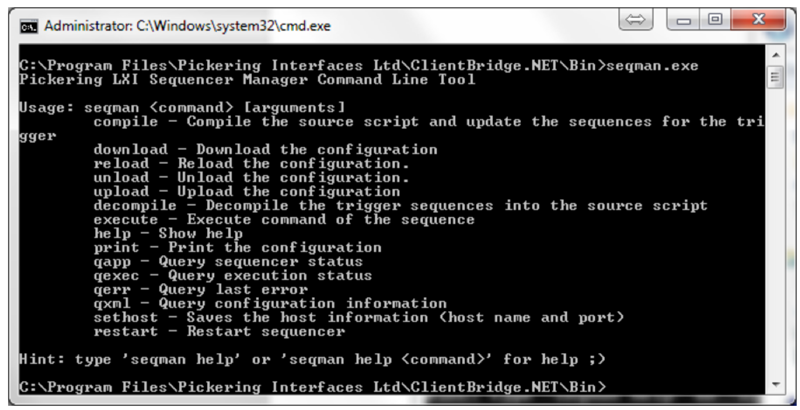
In order to start using Sequence Manager, the user will initially need to use the sethost command by adding the address of the target LXI device and its port. An example can be seen from the following image:

The user can then use the upload, download (target_filename), reload, unload, query application, query execution, query error, query XML, restart, compile and decompile commands. The compile and decompile commands use TriggerSourceScript class as part of Pickering.Lxi.Sequencing.dll to create a configuration file from a script or to generate a script from a configuration file.
Here is an example of downloading a sequence from a box, creating a text file using decompile, then compiling and uploading the modified file:

Please refer to the sources of seqman in the Examples folder. This application is provided as a reference to the Pickering.Lxi.Sequencing.dll API
4. Generating Sequences
Before attempting to generate sequences it’s important to have an understanding of the general architecture of a card.
A Pickering card will present switches in groups, referred to as SubUnits. Each card will contain one or more SubUnits with each SubUnit containing a collection of one or more switches, or other binary object types. Each SubUnit contains a set of objects of similar type or purpose with each object being represented by a single binary bit where the state of that bit represents the state of the hardware object, normally logic 1 for ON and logic 0 for OFF. These bits are contained in 32-bit unsigned integer containers, a DWORD type in the driver.
For example, a simple card containing 4 switches will present these switches as a single SubUnit containing 4 binary bits where the state of each bit represents the on/off state of each switch. A switch is controlled by altering the state of the bit representing that switch.
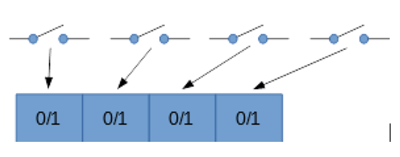
In more complex cases, the card will present multiple SubUnits. For example, a 4x4 matrix with isolation switches on the X axis will present 2 SubUnits: one containing 16 bits to represent the matrix and another SubUnit containing 4 bits to represent the isolation switches.

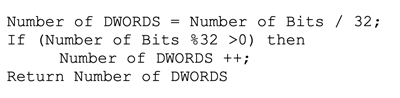
The switches in the SubUnit can be operated individually using OpBit or OpCrosspoint if it’s a matrix, or simultaneously using the WriteSub command. In order to write to the SubUnit, the user first needs to calculate the number of DWORDS required to write to the SubUnit. In the SWITCH SubUnit if the number of Bits is less than 32 than only one DWORD would be needed to hold the value else it can be best described in the following logic:
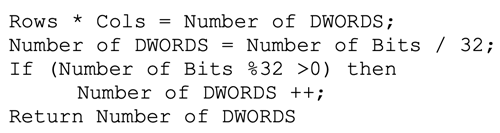
For a matrix SubUnit the number of rows multiplied by the number of columns will give the total number of bits required so the above logic can be modified to:
In the sequencing service the SubUnit data is represented in the following format:
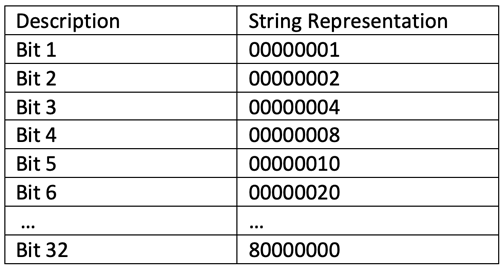
If there are more than one DWORDs, the strings are concatenated using a space in the middle with Most Significant Bit first in the order of sequences of bits.

The command format therefore is as follows:

The user can either use the string-based commands or use the Sequencing Parser API to convert commands in this format, as the following Format command shows:

1,1,A;4,2,B;2,3,C;1536,4,A; Which will compile to produce: write_sub CARD1 1 80000000 00000000 00000000 00000000 00000000 00000000 00000000 00000000 00000000 00000000 00000000 00000000 00000000 00000000 00000000 00000000 00000000 00000000 00000000 00000000 00000000 00000000 00000000 00000000 00000000 00000000 00000000 00000000 00000000 00000000 00000000 00000000 00000000 00000000 00000000 00000000 00000000 00000000 00000000 00000000 00000000 00000000 00000000 00000000 00000000 00000000 00000000 00000000 00000000 00000000 00000000 00000000 00000000 00000000 00000000 00000000 00000000 00000000 00000000 00000000 00000000 00000000 00000000 00000000 00000000 00000000 00000000 00000000 00000000 00000000 00000000 00000000 00000000 00000000 00000000 00000000 00000000 00000000 00000000 00000000 00000000 00000000 00000000 00000000 00000000 00000000 00000000 00000000 00000000 00000000 00000000 00000000 00000000 00000000 00000000 00000002 00000000 00000000 00000000 00000000 00000000 00000000 00000000 00000000 00000000 00000000 00000000 00000000 00000000 00000000 00000000 00000000 00000000 00000000 00000000 00000000 00000000 00000000 00000000 00000000 00000000 00000000 00000000 00000000 00000000 00000000 00000000 00000000 00000000 00000000 00000000 00000000 00000000 00000000 00000000 00000000 00000000 00000000 00000000 00000000 00000000 00000000 00000000 00000008 00000000 00000000 00000000 00000000 00000000 00000000 00000000 00000000 00000000 00000000 00000000 00000000 00000000 00000000 00000000 00000000 00000000 00000000 00000000 00000000 00000000 00000000 00000000 00000000 00000000 00000000 00000000 00000000 00000000 00000000 00000000 00000000 00000000 00000000 00000000 00000000 00000000 00000000 00000000 00000000 00000000 00000000 00000000 00000000 00000000 00000000 00000000 00000001
write_sub CARD1 2 04000000 00000000 00000000 00000000 00040000 00000000 00000200 00000000 00000001
The API can be used to compile and decompile the switch operation commands which can help users when writing or verifying their sequences.

