Pickering's Software Drivers and Application Software Packages

In test system development, the best hardware is only usable if its software control environment is robust and easy to use. If you are a test system developer, you need to look at both the hardware and software aspects of your vendors of choice.

Our commitment to delivering you high-quality products does not just extend to our switching and simulation products. Our in-house software team has created all of our application software packages and software drivers to help you simplify and expedite the development and deployment of your automated test systems. Please take a look below for our current offering.

Software Drivers and Application Software Packages | Pickering Interfaces
Pickering Software Drivers and Applications

Pickering Software Drivers

We provide driver packages for LXI and PXI products offering seamless installation and support of all popular Programming languages such as C/C++, LabVIEW™, LabVIEW RT, .NET, VB, LabWindows™/CVI, MATLAB®, Python, ATEasy, TestStand™, Veristand™ and Switch Executive™ (via the IVI driver). Our drivers use a common interface that has evolved over the years to add support for our growing range of switching and simulation products and support for the latest operating systems. We ensure that both our legacy and new switching products can work together for you and the interface also works well with both old and new applications.

In addition to driver software, we are committed to making it easier to develop test programs and maintain your test stations using our General Soft Front Panel.

  • Easy to use common driver interface for PCI, PXI and LXI products
  • All major Windows and Linux (both 32 and 64-Bit) platforms are supported
  • An example is provided for all Pickering products
  • Common General Soft Front Panel with dedicated views for all of our products

Download PXI Drivers

Download LXI Drivers

Download Example Programs

Download Software Manual

Diagnostic Test Tools

Our Diagnostic Test Tools include the following:

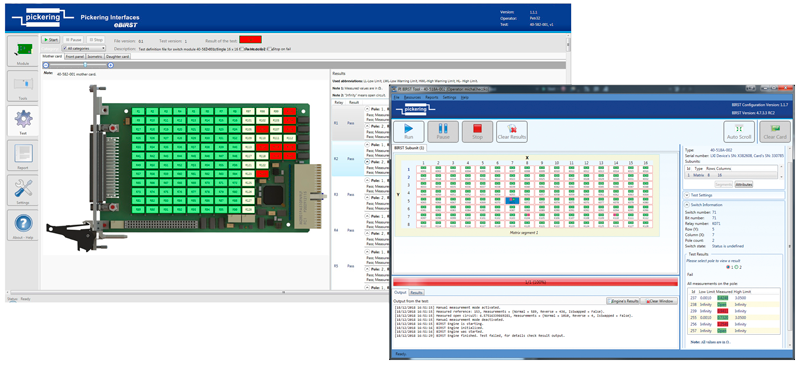
BIRST - Built-in Relay Self-Test and eBIRST Switching System Test Tools allow users to find faults in switching systems easily. Features include:

  • Quickly determine if your switching system has faults
  • Identify where that fault is located at the relay level and allow you to take fast corrective action
  • Save repair costs
  • Minimize downtime of your switching system
Relay Cycle Counting Tool — an advanced solution for monitoring the physical degradation of PXI cards and their internal components within a PXI or LXI chassis. The tool proactively identifies wear and tear in electrical components.
Diagnostic Test Tools - BIRST & eBIRST

Test System Architect 

Ease the Pain of Signal Path Design from Concept to Deployment

Transform your test system development with our free, powerful online graphical toolset for intuitively designing, managing, and visualizing all aspects of test system switching and signal routing with precision and efficiency. 

  • Comprehensive Signal Path Design
  • Enhanced Collaboration and Cloud Storage
  • Automated Documentation and Workflow
  • Powerful Product Selection and Migration Tools

The toolset includes:

System Configuration Tool

Schematic Design Tool

Cable Design Tool

Product Selector Tool

 Microwave Switch Design Tool

Explore Test System Architect

Pickering Remote Gateway

Remote control of Pickering PXI/PXIe modules

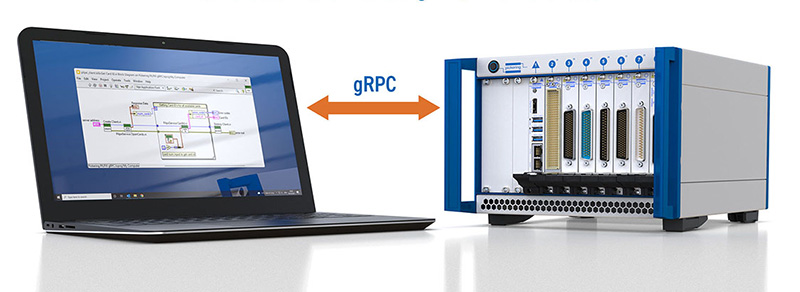
Pickering Remote Gateway lets you control Pickering PXI/PXIe modules over a network using gRPC. Keep your hardware in the lab while running test applications on other computers, with Pickering drivers installed only on the host connected to the chassis. Features include: 

  • Runs on Windows and Linux hosts
  • Generate client code for LabVIEW, Python, C#, Go, Java and other environments supporting gRPC and Protocol Buffers
  • Reuse existing Pickering modules and drivers through remote access to Pickering driver APIs
  • Pickering drivers required only on the host connected to the hardware
Ideal for automated validation, production test and shared lab resources, with test applications running separately from the instrument-control host.

View Pickering Remote Gateway Features

Pickering Remote Gateway - Remote control of Pickering PXI/PXIe modules
Sequence Manager Software

Sequence Manager Software

Pickering Interfaces is pleased to announce the launch of our Sequence Manager software. This sequencing service offering is available on all of our LXI platforms*. This functionality will allow users to set predefined switch/simulation operations on our 1000+ Pickering PXI switch and simulation modules supported by the LXI systems. Features include:

  • Systemwide sequencing allows you to address multiple switch and simulation cards in one sequence
  • Ability to upload up to 5000 pre-defined sequences
  • Hardware and software-based triggers provided
  • Sequence Manager negates Ethernet latencies when controlled using hardware triggers resulting in more deterministic results
  • Easy-to-use User Interfaces for defining and controlling test sequences

Learn more about Sequence Manager Software

Switch Path Manager Signal Routing Software

Our signal routing software, Switch Path Manager (SPM), simplifies signal routing through switching systems and speeds up the development of switching system software. Switch Path Manager supports our switching modules and the interconnection between them. Features include:

  • Manages Complex Switching Systems
  • Reduces Switching Software Development Effort
  • Provides Automated or Pre-defined Signal Routing
  • Supports PXI, LXI, PCI Systems
  • APIs available for C, .NET, Python, LabWindows™/CVI and LabVIEW™ Windows 32-bit or 64-bit compatible
  • Free Evaluation License

Learn more about Switch Path Manager

Request Free Evaluation License

Video: Cut Program Development Time in Half in 4 Easy Steps with Switch Path Manager 

Switch Path Manager
Switch Path Manager signal routing software
Pickering's PXI & LXI Simulation Tools

PXI & LXI Simulation Tools

Our PXI & LXI simulation tools help you accelerate the development process by simulating the product in your test system. These tools allow you to develop and test the system software independent of your application hardware. Using the tools can minimize the time required with the physical system.

Pickering can provide a simulation of products even before the product's design is complete.

  • Accelerate development and integration process
  • Easy to download and simulate any PXI or LXI product
  • Available as both hardware and software simulators

Download PXI Simulation Software *

Request an LXI Simulation Tool (hardware)

Download LXI Simulation Software

* The PXI Simulation software is part of our PXI driver installation

Need more information about our application software or software drivers? You can find many helpful articles in the software section of our Knowledgebase, or feel free to contact us.

Legacy ID Selector Tool

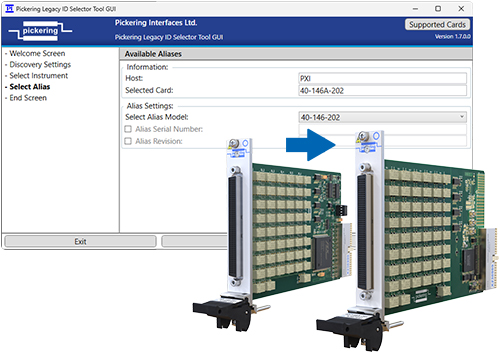
The Legacy ID Selector Tool helps test engineers maintain existing test software when replacing an old or obsolete Pickering product with a newer revision model. It allows the replacement module to be configured so that Pickering driver API calls return the legacy model ID, serial number and revision, helping validated test applications continue to run without software changes.

  • Simplifies replacement of legacy Pickering products
  • Maps a newer revision product’s ID to the predecessor model
  • Helps validated test software continue running unchanged
  • Supports compatible PCI, PXI and LXI systems
  • Reduces test station maintenance time
Download the Legacy ID Selector Tool

View our Knowledgebase article to learn more

Pickering's Legacy ID Selector Tool
Loading

Test System Architect

Design and Visualize Complete Test System Signal Paths

Bring system configuration, schematic design, cable design and product selection into a single, cohesive workflow for test system development using our Test System Architect online toolset.

Learn more

Beta

How can I help?

Hi , I'm TESS - your friendly AI agent

Press Enter to submit

TESS is a moderated, AI agent. TESS can make mistakes, please verify important information independently.


Chat history

Log in or create an account to save & continue your chats with TESS.

Log in

or create an account